|
Check material needs for work orders at a glance. See all Bill of materials with their stock coverage, shortage status, required quantities, and warehouse availability — all in a single, filterable report.
Accessing the view
1. Navigate to the Analytics section (or search for "Material Requirements").
2. Direct URL: /views/material-requirements
3. Click on the Material Requirements tile in the Production Cockpit

The Material Requirements view is an analytics report in the Beas Web Client that shows the material needs for one or more work orders. For each BoM material line, the report displays:
•Status — Whether stock is sufficient (OK), insufficient (Not OK), closed, or represents a negative correction.
•Coverage — A visual progress bar showing the percentage of the required quantity that is covered by available stock.
•Quantities — Required (needed), open, booked, and reserved quantities per material.
•Stock — Total available stock across all warehouses and stock in the default warehouse, with color-coded values indicating sufficiency.
•Work Order context — The work order and position from which each material requirement originates.
This view is particularly useful for production planners and warehouse managers who need to quickly assess whether all materials are available before starting or continuing production.
Quick Shortage Check:
Use the Only Shortage check box to instantly filter the report down to materials that have insufficient stock. This lets you focus immediately on problem items that need attention.
|
The following controls are available (where applicable) with the Beas Web Client.
Navigation bar
When viewing a material or operation detail page, you can navigate between positions without returning to the list view. A navigation toolbar with four arrow buttons is available at the top of the page:
Button
|
Icon
|
Action
|
First
|

|
Jump to the first position in the list.
|
Previous
|

|
Move to the previous position.
|
Next
|

|
Move to the next position.
|
Last
|

|
Jump to the last position in the list.
|
A Refresh  button is also available to reload the current position's data from the server without navigating away. button is also available to reload the current position's data from the server without navigating away.
The navigation order follows the position ordering from the list view (respecting any active sort). Navigating between positions updates the URL, breadcrumb, header, and all form sections in place. Navigation wraps around: pressing Next on the last position moves to the first, and vice versa.
Quick Review Workflow: Use the navigation arrows to quickly review all materials or operations in sequence. This is particularly useful during BoM audits or routing reviews, where you need to inspect each position without repeatedly returning to the list.
Sorting, freezing usability
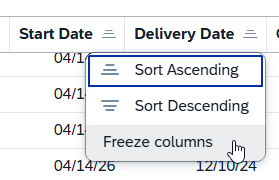
You can sort the tables by ascending or descending values.
"Freeze column" function: Click on a column title to access the function. You can block a column from getting scrolled while browsing left-right in the results. When this is active, the column stays visible, while others get scrolled. You can also freeze multiple columns counting from the first one. To deactivate the function, click the same column and select "Unfreeze".
Filter window

Field
|
Description
|
Select All
|
Select all entries in the list
|
Show selected
|
Display selected column entries and hide unselected ones
|
Show all
|
Display all column entries in the list
|
Reset
|
Reset "Select All" to only selected entries
|
Search field: Search by the indicated prompts or click the browse button  where applicable for multiple selection. where applicable for multiple selection.
Grid Tool bar
The grid toolbar above the results table provides several actions for working with the data:
Button
|
Icon
|
Description
|
Export
|

|
Export the current grid data to Excel or CSV for offline analysis or sharing.
|
Full screen
|

|
Expand the grid to fill the entire screen for better visibility when working with many columns.
|
Sort
|

|
Open the sort configuration to define multi-column sort orders.
|
Filter
|

|
Toggle column-level filter row for fine-grained filtering within the grid.
|
Group
|

|
Configure grouping by one or more columns (e.g., group by Item Code or Warehouse to see aggregated views).
|
Settings (gear icon)
|

|
Open the column chooser to show/hide columns, reorder them, and resize column widths.
|
You can also click any column header directly to sort by that column, or drag a column header to the grouping area to group by that column.
Action Buttons
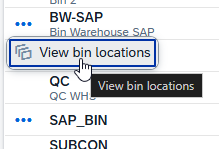
Action buttons appear only when applicable for a column. You can access them by clicking on the three dots left of the relevant field:
|
The filter bar at the top of the view provides several fields to narrow down the material requirements. At least one identifying criterion (Bar code, Work Order ID, or Position ID) must be provided before the search can be executed.
Filter
|
Type
|
Description
|
Bar code
|
Text input
|
Enter or scan a bar code to look up materials for a specific work order. This is designed for use on the production floor with a bar code scanner.
|
Work Order ID
|
Multi-select lookup
|
Select one or more work orders. Click the browse button to open a List dialog that lets you search and select work orders by document entry, sales order, item code, or customer name. You can select multiple work orders to view their combined material requirements. Selected work orders appear as removable chips (e.g., 4 × 5 ×).
|
Position ID
|
Multi-select lookup
|
Optionally narrow the search to specific work order positions. Click the browse button to open the "Position ID" dialog box. The available positions are cascaded from the selected Work Order IDs — only positions belonging to the selected work orders are shown in the lookup dialog.
|
Date Range
|
Date range (From – To)
|
Filter by operation start date. Use the calendar pickers to set a from-date and/or to-date. Only materials linked to operations within this date range are included.
|
Status
|
Drop-down
|
Filter results by material status. Options:
•All (default) — Show all statuses.
•OK — Only materials with sufficient stock.
•Not OK — Only materials with insufficient stock.
•Closed — Only closed/completed lines.
•Negative — Only negative correction lines. |
Only Shortage
|
Check box
|
When checked, shows only materials with a Not OK status that are not closed and not negative corrections. This is a quick filter for identifying materials that genuinely need attention.
|
Group by Item
|
Check box
|
When checked, materials with the same item code are consolidated into a single summarized row, aggregating quantities across all work orders and positions. Useful for getting a total picture of demand per material.
|
Adapt Filters
Click the Adapt Filters link at the top-right of the filter bar to customize which filter fields are visible. A dialog opens where you can:
•Toggle individual filter fields on or off using check boxes.
•Reorder fields by dragging them to your preferred position.
•Search for specific filter fields by name.
•Use Select All / Deselect All to quickly show or hide all filters.
Your filter layout preferences are persisted across sessions, so you only need to configure them once.
Clear Button
Click Clear to reset all filter fields to their default (empty) values. This does not clear the grid results — it only resets the filter inputs.
|
1. Enter at least one of the following: a Bar code, one or more Work Order IDs, or a Position ID.
2. Optionally set a Date Range, Status filter, or check Only Shortage or Group by Item.
3. Click the Go button (blue, with a magnifying glass icon). The system queries the backend and loads all matching material requirement lines into the grid.
NOTE: Required Input The search requires at least a Bar code, Work Order ID, or Position ID. If none of these are provided, clicking Go will have no effect and the grid will remain empty.
The grid title shows the total count of results, e.g., "Material Requirements (12)".
|
The results are displayed in columns, with color-coded indicators, and quantity values shown with their units of measure. The grid supports sorting, grouping, column reordering, and fullscreen mode.
Default Columns
The following columns are visible by default:
Column
|
Description
|
Status
|
A colored badge indicating the material's stock coverage status. See Status Column for details.
|
Coverage
|
A visual progress bar with a percentage value showing how much of the required quantity is covered by available stock. See Coverage Indicator.
|
Item Code
|
The material/item code (e.g., M0000001, FP0006). This column supports grouping — you can group all rows by item code to see which work orders use the same material.
|
Description
|
The item description (e.g., "Material 1", "Final product - As an order i...").
|
Needed Qty
|
The total required quantity for this material line, shown with the unit of measure (e.g., "300.000000 m"). The number of decimal places is determined by the material's configuration.
|
Open Qty
|
The open (outstanding) quantity: Required minus Booked minus Reserved. Shown with the unit of measure. If the open quantity is negative, it is displayed in red bold text.
|
Booked
|
The quantity already booked (issued) from stock, with unit of measure.
|
Reserved
|
The quantity reserved against this requirement, with unit of measure.
|
Stock
|
Total available stock across all warehouses. Displayed in green when sufficient (stock ≥ open qty), or red when insufficient (stock < open qty). See Stock Color Coding.
|
Default Whs Qty
|
Stock available in the default warehouse for this material, with unit of measure.
|
Warehouse
|
The default warehouse code (e.g., 01). This column supports grouping.
|
Work Order
|
The work order identifier or sales order reference from which this material requirement originates (e.g., WO_000003, SO_20250001:1).
|
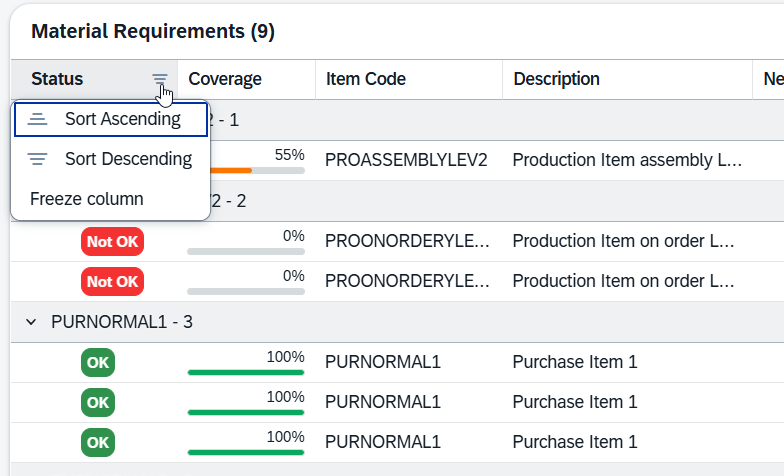
"Freeze column" function in Material requirements: Click on a column title to access the function. You can block a column from getting scrolled while browsing left-right in the results. When this is active, the column stays visible, while others get scrolled. You can also freeze multiple columns counting from the first, "Status". To deactivate the function, click the same column and select "Unfreeze".
Quantity Formatting All quantity values are displayed with a unit of measure suffix (e.g., "25.000000 m", "110.000000 m"). The number of decimal places varies per material and is determined by the material master data configuration. This is intentional — some materials use whole numbers while others require high precision.
|
The Status column displays a colored badge that immediately communicates the stock coverage situation for each material line. There are four possible status values:
Badge
|
Status
|
Description
|
OK
|
OK
|
Sufficient stock is available to cover the material requirement. The coverage percentage is 100% or higher. No action is needed for this material.
|
Not OK
|
Not OK
|
Insufficient stock to cover the full requirement. The coverage percentage is below 100%. This material needs attention — stock may need to be replenished, transferred, or purchased.
|
Closed
|
Closed
|
The material requirement line has been closed or completed. No further action is expected. Closed lines do not show a coverage bar.
|
Negative
|
Negative
|
The line represents a negative correction or return (required quantity is less than zero). This is an independent flag that indicates the line is a reversal rather than a standard requirement.
|
Note: Independent Flags The "Closed" and "Negative" statuses are independent flags. They take precedence over the OK/Not OK stock coverage status when displayed. A line that is both "Not OK" in terms of coverage but has been manually closed will show as Closed.
|
The Coverage column provides a visual progress bar alongside a percentage value, giving you an instant sense of how well each material's requirement is covered by available stock.
How It Looks
Each non-closed row shows a small horizontal bar (filled proportionally to the coverage percentage) followed by the percentage value:
Example
|
Coverage
|
Description
|
 100% 100%
|
Fully covered
|
All required quantity is available in stock. No shortage.
|
56%
|
Partially covered
|
More than half the requirement is available, but there is still a gap.
|
17%
|
Critically low
|
Less than half the requirement is covered. Urgent attention needed.
|
Color Thresholds
Coverage
|
Bar Color
|
Description
|
100% or higher
|
Green
|
Fully covered. Stock meets or exceeds the requirement.
|
50% – 99%
|
Orange
|
Partially covered. A shortfall exists but more than half is available.
|
Below 50%
|
Red
|
Critically under-covered. Less than half the material is available.
|
Closed lines do not display a coverage bar or percentage — they show an empty cell, since coverage is no longer relevant once a requirement has been closed.
|
The Stock column (total available stock across all warehouses) uses color coding to help you quickly identify materials with sufficient or insufficient inventory:
Condition
|
Color
|
Description
|
Stock ≥ Open Quantity
|
Green
|
There is enough total stock to cover the remaining open requirement.
|
Stock < Open Quantity (and Open Qty > 0)
|
Red
|
Total stock is not enough to fully cover the open requirement. A shortage exists.
|
Additionally, the Open Qty column displays values in red bold text when the open quantity is negative (meaning more has been booked or reserved than originally required).
Reading the Grid at a Glance Combine the three visual indicators for a rapid assessment:
•Check the Status badge for the overall verdict (OK / Not OK).
•Glance at the Coverage bar for the proportion covered.
•Look at the Stock value color to see whether total inventory can close the gap. |
Beyond the default columns, the grid offers over 40 additional columns that are hidden by default. Enable them using the grid settings (gear icon) in the table toolbar. The additional columns are organized into the following categories:
Operation Information
Column
|
Description
|
Operation ID
|
The operation to which this material is linked.
|
Operation Description
|
Description of the linked operation.
|
Operation Start Date
|
Scheduled start date of the operation.
|
Work Order Details
Column
|
Description
|
Work Order ID
|
The work order document entry number.
|
WO Position ID
|
The work order position line number.
|
BOM Line ID
|
The BOM line number within the work order.
|
Display Line Number
|
A display-friendly line number.
|
Position Text
|
The position text/label.
|
Customer Code
|
The customer associated with the work order.
|
Customer Name
|
The customer's name.
|
Project Code
|
The project code linked to the work order.
|
Branch ID / Branch Name
|
The branch associated with the work order.
|
Material Details
Column
|
Description
|
Short Variant
|
Short variant identifier for the material.
|
Variant Routing Index
|
Index for variant-based routing.
|
Version
|
Material version.
|
Drawing Number
|
Drawing number associated with the material.
|
Supplier Code
|
The preferred supplier for this material.
|
Additional Quantities
Column
|
Description
|
Planned Qty
|
The planned production quantity.
|
Transferred Qty
|
Quantity already transferred.
|
Transfer Request Qty
|
Quantity in pending transfer requests.
|
Ordered Qty
|
Quantity on purchase orders.
|
Requested Qty
|
Quantity in purchase requests.
|
Stock & Warehouse Details
Column
|
Description
|
Staging Area Stock
|
Stock in the staging area.
|
Total Reservations
|
Total quantity reserved across all requirements.
|
On Order Quantity
|
Quantity currently on order (incoming).
|
Committed Quantity
|
Quantity committed to other orders.
|
Lead Time (Days)
|
Expected lead time for procurement.
|
Bin Code
|
Bin location within the warehouse.
|
Dimensions
Column
|
Description
|
Dimension 1 / 2 / 3
|
Dimensional values for the material (length, width, height).
|
Assembly Information
Column
|
Description
|
Assembly Item Code
|
The parent assembly item.
|
Assembly Item Name
|
Description of the assembly item.
|
Assembly Drawing Number
|
Drawing number for the assembly.
|
Assembly Quantity
|
Quantity of the assembly.
|
Managed by Serial / Batch
|
Whether the assembly is tracked by serial or batch numbers.
|
Dates & Purchasing
Column
|
Description
|
Purchase Delivery Date
|
Expected delivery date from the supplier.
|
Required Date
|
Date by which the material is needed.
|
Purchase UoM
|
Unit of measure used for purchasing.
|
Purchase Conversion Factor
|
Conversion factor between purchase and inventory UoM.
|
Custom Fields
Up to 6 custom fields (Custom Field 1 through Custom Field 6) are available for business-specific data configured in your system.
|
Help URL: https://help.beascloud.com/beas202604/index.html?material-requirements.html
|
