The QC Samples view lists the open samples of all quality-control orders, with one row per QC measurement. It gives quality staff a single place to see, across every QC order, which samples still have measurement points to record, which are in error, and which are waiting for release — together with the item, batch, inspection plan, blockage reason and valuation of each sample. A sample is one unit of a QC order that has to be checked. Depending on the QC inspection plan, checking is performed per piece, per a number of pieces, per a number of minutes, or per serial number — and a separate sample is created for each unit.
Note: This view is read-only. It is a monitoring and search list: samples cannot be created, edited or released here. Recording measurements and releasing samples is done in the QC Order > Register per sample function of Beas. Use this view to find a sample and review its current status, then open the QC order in Beas to act on it.
Accessing the view
Open QC Samples from either entry point:
The QC Samples tile in the Quality Control group of the home screen.
The QC Samples entry under Quality Control in the navigation menu.
Direct URL: views/qc-samples
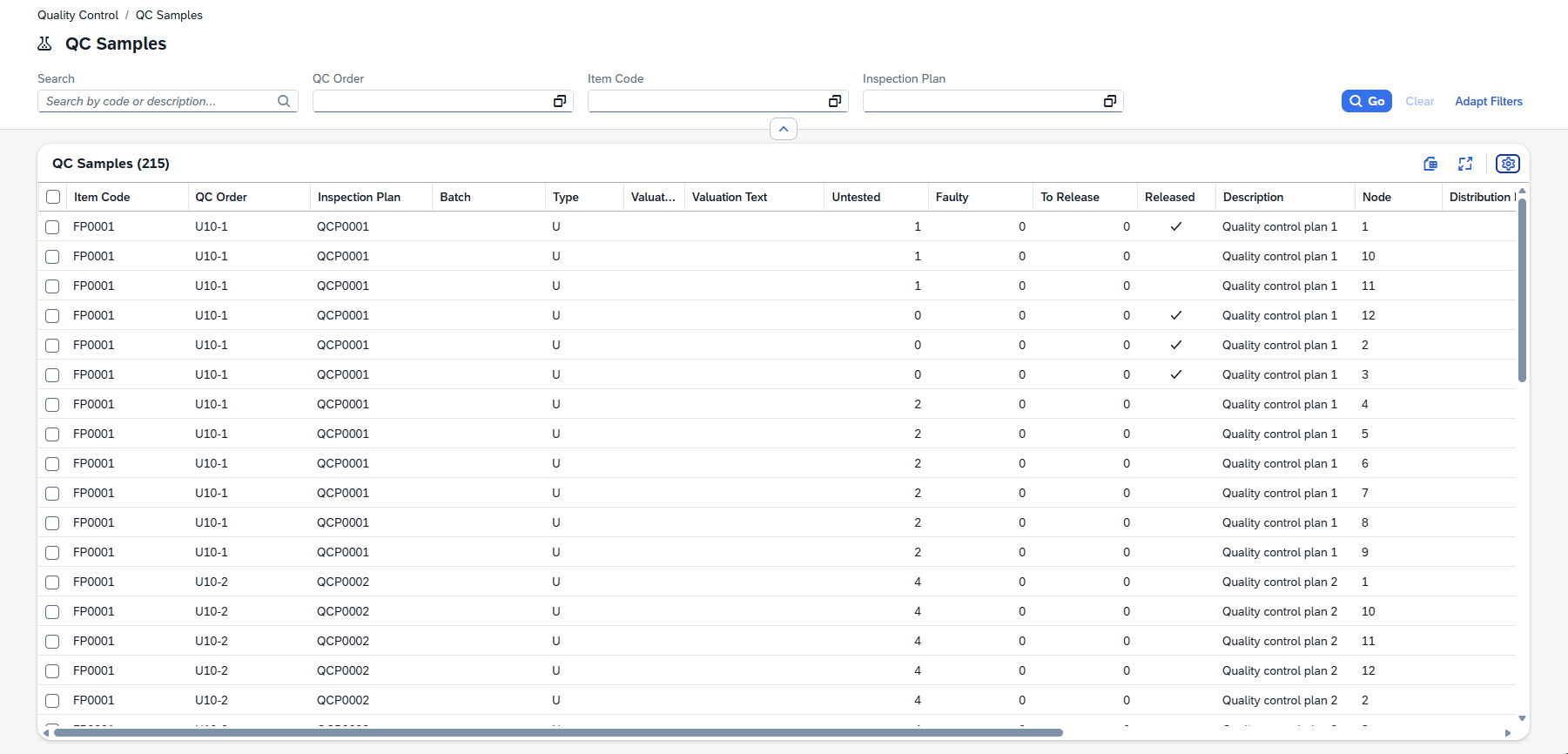
Sections of the view
Filters and search
Filters and search A free-text search box matches your term across the sample's QC order, document, item, inspection plan, batch and node. In addition, the following named searches narrow the list to a single field:
Default filters:
Named search |
Filters by |
|---|---|
QC Order |
The QC order the sample belongs to. |
Document |
The QC order's document number (a numeric value). |
Item |
The inspected item. |
Inspection Plan |
The QC inspection plan applied to the sample. |
Columns / Filters
You can choose any of these hidden columns to appear in the filter header input fields besides the default ones. Each row represents one QC measurement. The columns below are shown by default:
Column |
Description |
|---|---|
Item code |
The item being inspected. |
QC Order |
The quality-control order the sample belongs to. |
Inspection Plan |
The QC inspection plan applied to the sample. |
Batch |
The batch being inspected. |
Blockage Reason icon |
The blockage-reason indicator, shown as an icon in the color configured for that reason (see Status indicators). |
Blockage Reason Description |
The text of the blockage reason applied to the sample. |
Blockage Reason Code |
Alphanumeric code to identify the blockage reason. |
Valuation |
The valuation indicator, shown as an icon in the color configured for that valuation (see Status indicators). |
Valuation Text |
The text of the valuation assigned to the sample. |
Open Points |
The number of relevant measurement points that are still open — not yet released and not blocked. |
Error Points |
The number of measurement points that are in error — not OK and blocked, and not yet released. |
Release Points |
The number of relevant points that are OK but not yet released. |
Last Change |
The date and time the sample's measurement points were last changed. |
Column |
Description |
|---|---|
Type |
The type of input: Attribute, Text, Measurement |
Released |
Indicates whether the sample has been released. |
Info |
Free-text information held on the QC order. |
Node |
Identifies the measurement's node within the QC order; together with the QC order and document number it forms the sample's unique key. |
Distribution Number |
The number of the individual sample within the QC order, used when checking is performed per piece, per a number of pieces or per serial number and each unit becomes its own sample. |
Created |
The date and time the sample was created. |
Created By |
The user who created the sample. |
Modified |
The date and time the sample was last modified. |
Modified By |
The user who last modified the sample. |
The Block and Valuation columns are shown as colored icons rather than plain text. The icon and its color are not fixed thresholds — they are taken from the master data of the corresponding blockage reason and valuation, i.e. the same icon and color you configure in QC Blockage Reasons and QC Valuations. Because both are freely configurable, there is no fixed color legend; read the accompanying Blockage Reason and Valuation Text columns for the exact wording.
Tips Find work to do: Sort or filter by Open Points to surface samples that still need measurements recorded, or by Error Points to find samples with out-of-tolerance results. Personalize columns: Use the grid's column settings to show, hide and reorder columns — including the hidden Type, Info, Node, Distribution Number and audit columns. Your layout is remembered per view.