The Item Bill of Materials page lists every BoM defined for the items in your company. A Bill of Materials describes the components and quantities required to produce a finished or semi-finished item. From this list you can search, filter, sort, and open any BoM to review its full structure.
Read-only access: When opened from the Beas Manufacturing extension inside the SAP Web Client (item detail page), this list is read-only — actions like Create or Delete are not available in that context.
Accessing the view:
Open the Bill of Materials from SAP Web Client > Advanced Production > Bill of Materials
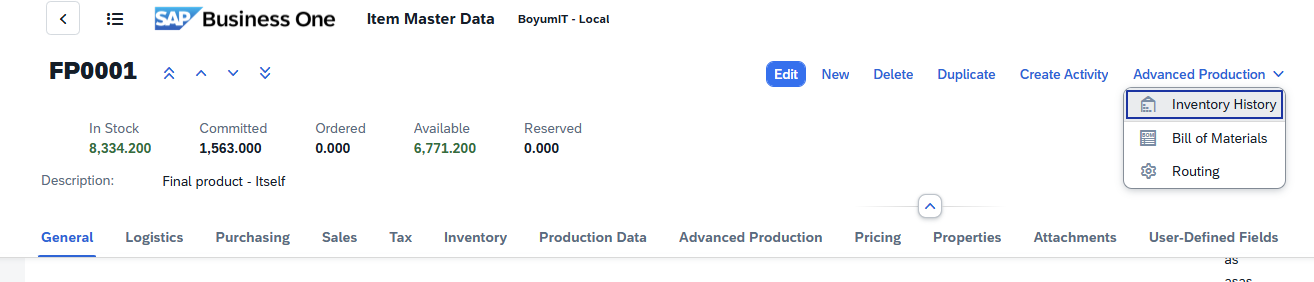
Direct URL: /views/items/[code]/bill-of-materials.


|
The following controls are available (where applicable) with the Beas Web Client.
Navigation bar When viewing a material or operation detail page, you can navigate between positions without returning to the list view. A navigation toolbar with four arrow buttons is available at the top of the page:
A Refresh The navigation order follows the position ordering from the list view (respecting any active sort). Navigating between positions updates the URL, breadcrumb, header, and all form sections in place. Navigation wraps around: pressing Next on the last position moves to the first, and vice versa. Quick Review Workflow: Use the navigation arrows to quickly review all materials or operations in sequence. This is particularly useful during BoM audits or routing reviews, where you need to inspect each position without repeatedly returning to the list.
Sorting, freezing usability
Filter window
Search field: Search by the indicated prompts or click the browse button
Grid Tool bar The grid toolbar above the results table provides several actions for working with the data:
You can also click any column header directly to sort by that column, or drag a column header to the grouping area to group by that column.
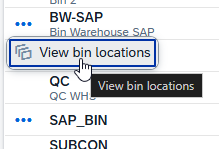
Action Buttons Action buttons appear only when applicable for a column. You can access them by clicking on the three dots left of the relevant field:
|


 button is also available to reload the current position's data from the server without navigating away.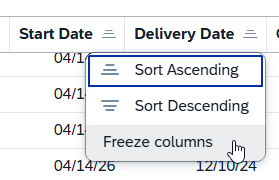


Header area
Search: Search for an operation by operation code or description.
Resource: Click the browse button  to select a resource from the table
Default Columns
Field |
Description |
|---|---|
Image |
Image saved for the operation |
Position |
Routing position |
Material Code |
Item number |
Version |
Item version |
Description |
Routing description. |
Quantity |
Quantity |
Unit of Measure |
Unit of Measure (Pcs, kg etc.) |
Linked Operation |
Linked routing identifier, when applicable. |
Active |
When check mark is enabled, the material is active |
Use Own Description |
Own description |
Input Factor |
The use factor of the operation |
Quantity Per |
The assembly quantity that the time refers to. |
Scrap Percentage |
The percentage of scrap |
Warehouse code |
Warehouse Code |
Bin Code |
Bin Location number |
Drawing number |
Drawing number |
Customer-defined fields (UDFs) configured for the Bill of Materials Header are appended automatically. Hidden columns are available in tool bar settings ( )
)
Row actions
Click any row's navigation arrow on the right to open the BoM. The list itself is the entry point; opening a row navigates you to the BoM detail.
Tips
Pre-filtered context: When launched from an item in the SAP Web Client, the list is automatically filtered to that item's BoMs. Clear the search to widen the view.
Pagination: The grid loads results in pages — use the toolbar pager controls to move through large result sets.
Export: Use the toolbar's export action to download the visible list as CSV or Excel.