|
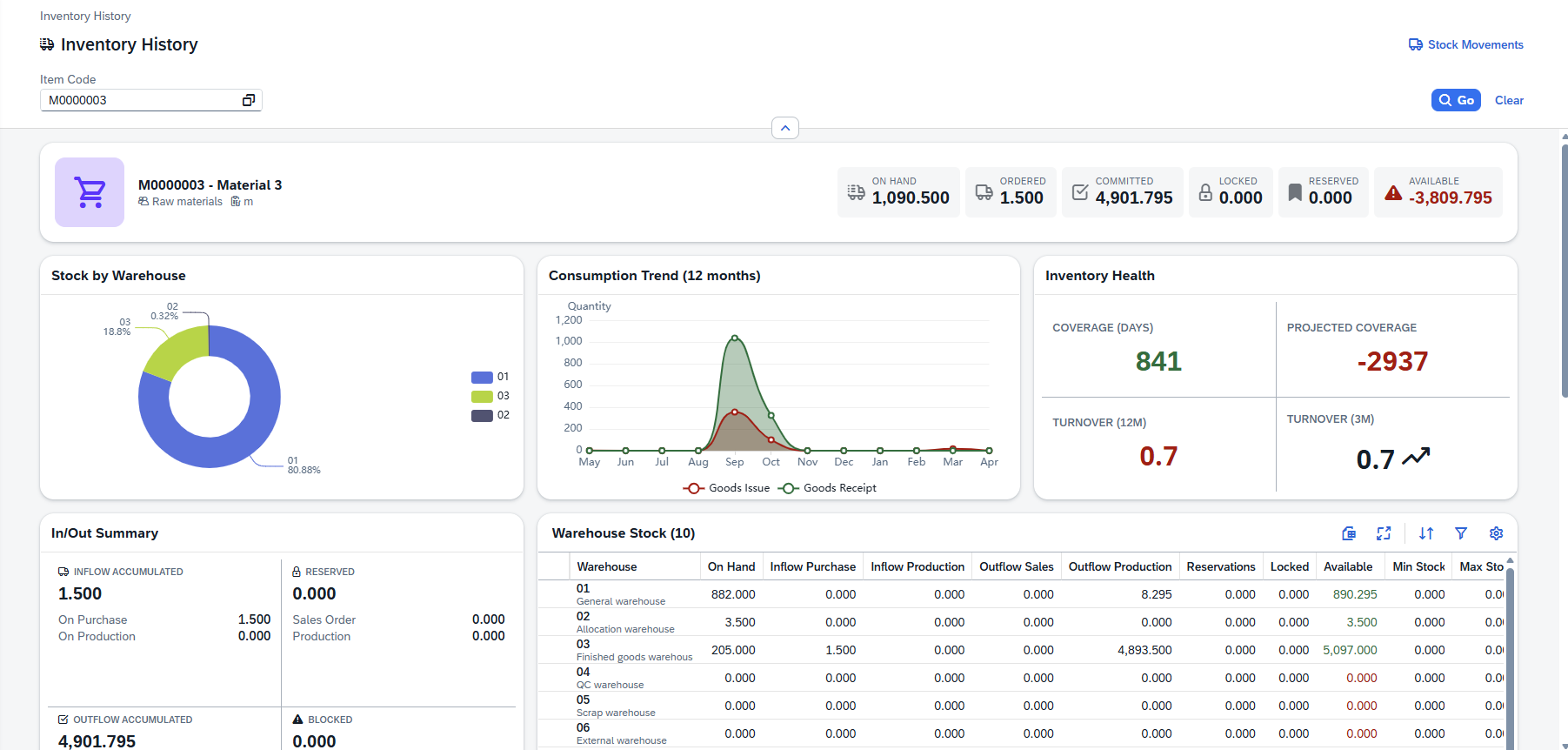
The Inventory History page provides a comprehensive, real-time view of a single item's inventory across all warehouses, open documents, MRP plans, and key performance indicators.
Accessing the view:
Open the Bill of Materials from SAP Web Client > Advanced Production > Inventory History
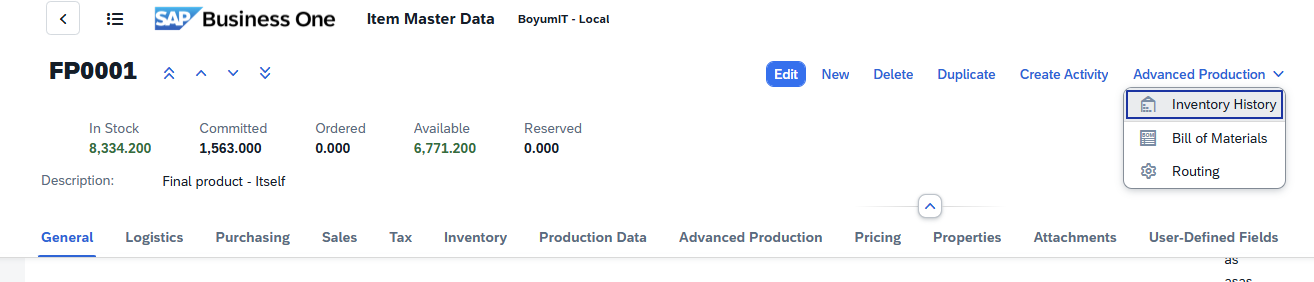
Direct URL: views/inventory-movements
|
The following controls are available (where applicable) with the Beas Web Client.
Navigation bar
When viewing a material or operation detail page, you can navigate between positions without returning to the list view. A navigation toolbar with four arrow buttons is available at the top of the page:
Button
|
Icon
|
Action
|
First
|

|
Jump to the first position in the list.
|
Previous
|

|
Move to the previous position.
|
Next
|

|
Move to the next position.
|
Last
|

|
Jump to the last position in the list.
|
A Refresh  button is also available to reload the current position's data from the server without navigating away. button is also available to reload the current position's data from the server without navigating away.
The navigation order follows the position ordering from the list view (respecting any active sort). Navigating between positions updates the URL, breadcrumb, header, and all form sections in place. Navigation wraps around: pressing Next on the last position moves to the first, and vice versa.
Quick Review Workflow: Use the navigation arrows to quickly review all materials or operations in sequence. This is particularly useful during BoM audits or routing reviews, where you need to inspect each position without repeatedly returning to the list.
Sorting, freezing usability
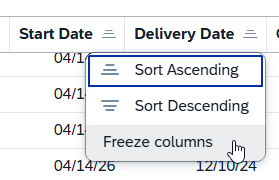
You can sort the tables by ascending or descending values.
"Freeze column" function: Click on a column title to access the function. You can block a column from getting scrolled while browsing left-right in the results. When this is active, the column stays visible, while others get scrolled. You can also freeze multiple columns counting from the first one. To deactivate the function, click the same column and select "Unfreeze".
Filter window

Field
|
Description
|
Select All
|
Select all entries in the list
|
Show selected
|
Display selected column entries and hide unselected ones
|
Show all
|
Display all column entries in the list
|
Reset
|
Reset "Select All" to only selected entries
|
Search field: Search by the indicated prompts or click the browse button  where applicable for multiple selection. where applicable for multiple selection.
Grid Tool bar
The grid toolbar above the results table provides several actions for working with the data:
Button
|
Icon
|
Description
|
Export
|

|
Export the current grid data to Excel or CSV for offline analysis or sharing.
|
Full screen
|

|
Expand the grid to fill the entire screen for better visibility when working with many columns.
|
Sort
|

|
Open the sort configuration to define multi-column sort orders.
|
Filter
|

|
Toggle column-level filter row for fine-grained filtering within the grid.
|
Group
|

|
Configure grouping by one or more columns (e.g., group by Item Code or Warehouse to see aggregated views).
|
Settings (gear icon)
|

|
Open the column chooser to show/hide columns, reorder them, and resize column widths.
|
You can also click any column header directly to sort by that column, or drag a column header to the grouping area to group by that column.
Action Buttons
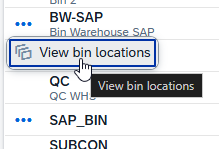
Action buttons appear only when applicable for a column. You can access them by clicking on the three dots left of the relevant field:
|
Searching for an Item
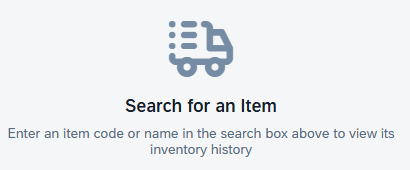
When you first open the page you will see an empty state prompting you to search for an item. You can enter the Item code in the top left corner.
Quick Search
1.Type at least 2 characters of an item code or name into the search bar.
2.A drop-down appears with up to 10 matching items (code + name).
3.Click a result or press Enter to select it.
4.Press Esc to close the drop-down without selecting.
Choose From List (Value Help)
Click the Value Help button (at the right of the search field) to open a full dialog where you can browse, search, and filter all items:
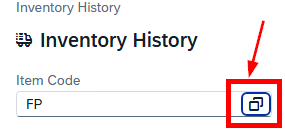
Once an item is selected, click Go on the top right, and the page loads all inventory data automatically.
Tip: You can navigate directly to an item by using the URL /inventory-history/{ItemCode}. Bookmark it for quick access.
After selecting an item a header card appears showing the item's identity and six KPI tiles.

Item Information
Element
|
Description
|
Item Type Icon
|
Automatically determined based on the procurement method (Buy / Make) and disposition type. Hover for a tooltip explaining the type.
|
Item Code & Name
|
The item's code (bold heading) and its description.
|
Item Group
|
The item group name, shown with a group icon.
|
Unit of Measure
|
The inventory unit of measure, shown with a measure icon.
|
KPI Tiles
Six key figures are displayed as tiles on the right side of the header:
KPI
|
Description
|
On Hand
|
Current physical stock across all warehouses.
|
Ordered
|
Quantity on open purchase orders + open production orders (expected inflow).
|
Committed
|
Quantity committed to open sales orders + production orders (expected outflow).
|
Locked
|
Blocked / locked stock quantity.
|
Reserved
|
Reserved stock quantity.
|
Available
|
Calculated availability. Displayed in green when positive, red when zero or negative.
|
|
Three chart cards are displayed in a row below the header card.

Stock by Warehouse (Pie Chart)
A pie chart showing the on-hand quantity distribution across warehouses.
•Shows the top 6 warehouses by stock; remaining warehouses are grouped under "Others".
•Hover over a segment to see the warehouse code and percentage.
•If there is no warehouse stock, the message "No warehouse stock data" is shown.
Consumption Trend (Line Chart)
A line chart showing the last 12 months of consumption and production activity.
Line
|
Color
|
Description
|
Consumed
|
Red
|
Monthly outflow / consumption quantities.
|
Ordered
|
Green
|
Monthly inflow / production quantities.
|
Both lines have shaded area fills for easier visual comparison. The X-axis shows month abbreviations; the Y-axis shows quantity.
Inventory Health KPIs
Four health metrics displayed in a 2×2 grid with automatic color coding:
Metric
|
What it measures
|
Green
|
Red
|
Coverage (days)
|
How many days current on-hand stock will last, based on 12-month average daily consumption.
|
≥ 30 days
|
< 7 days
|
Projected Coverage
|
Same as Coverage but uses the total available quantity (on-hand + on-order − committed).
|
≥ 30 days
|
< 7 days
|
Turnover (12M)
|
Inventory turnover ratio over the last 12 months (outflow ÷ average inventory).
|
≥ 4.0
|
< 1.0
|
Turnover (3M)
|
Inventory turnover ratio over the last 3 months. Includes a trend arrow comparing to the 12M rate (up = improving, down = declining).
|
≥ 1.0
|
< 0.25
|
|
A summary card showing accumulated order and reservation quantities, organized in two columns.
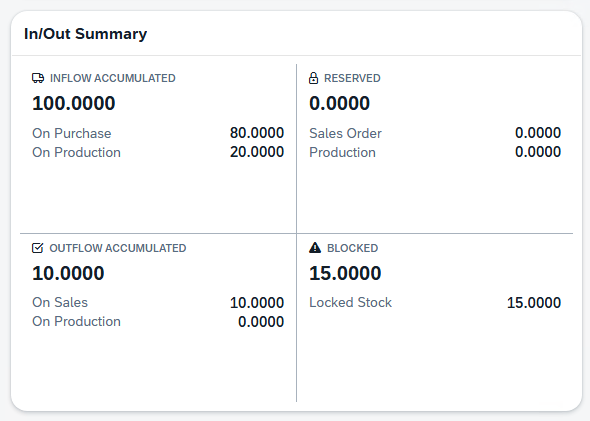
Inflow (Accumulated)
•Total on-order quantity.
•Breakdown: On Purchase + On Production.
Outflow (Accumulated)
•Total committed quantity.
•Breakdown: On Sales + On Production.
Reserved
•Total reserved quantity.
•Breakdown: Sales Order + Production.
Blocked
•Total blocked stock. Displayed in red when greater than zero.
•Breakdown: Locked Stock.
Warehouse Stock Table
A detailed table showing stock levels per warehouse. It is displayed alongside the In/Out Summary panel.
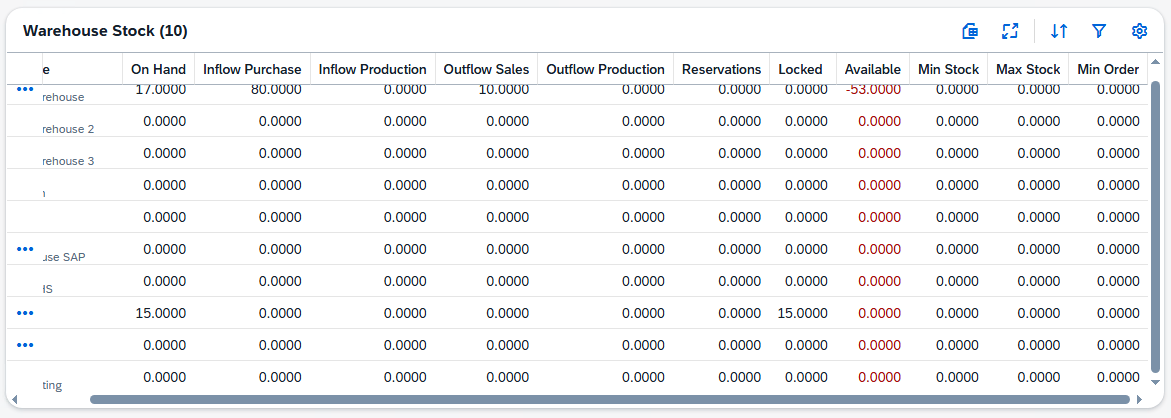
Columns
Column
|
Description
|
Warehouse
|
Warehouse code and name.
|
On Hand
|
Physical stock in this warehouse.
|
Ordered Purchase
|
Open purchase order quantity for this warehouse.
|
On Order Prod
|
Open production order quantity for this warehouse.
|
Committed Sales
|
Committed to sales orders from this warehouse.
|
Committed Prod
|
Committed to production orders from this warehouse.
|
Reservations
|
Reserved quantity in this warehouse.
|
Locked
|
Locked / blocked stock in this warehouse.
|
Available
|
Calculated availability. Shown in green when positive or red when zero or negative.
|
Min Stock
|
Minimum stock level configured for this warehouse.
|
Max Stock
|
Maximum stock level configured for this warehouse.
|
Min Order
|
Minimum order quantity configured for this warehouse.
|
Actions
|
Context-sensitive action buttons (see below).
|
Action Buttons
Action buttons appear only when applicable for each warehouse row. You can access them by clicking on the three dots left of the relevant field:
Button
|
Condition
|
Opens
|
Bin Locations
|
Warehouse has bin locations enabled.
|
Dialog showing stock per bin location. See Bin Locations Dialog.
|
Batch Numbers
|
Item uses batch management and on-hand > 0.
|
Dialog listing batches with quantity, expiration date, manufacturing date, and status. See Batch Numbers Dialog.
|
Serial Numbers
|
Item uses serial management and on-hand > 0.
|
Dialog listing serial numbers with status, manufacturing date, and expiration date. See Serial Numbers Dialog.
|
Reservations
|
Warehouse has reservations > 0.
|
Dialog listing reservations with quantity, lock level, and type. See Reservations Dialog.
|
|

Shows all open production orders (work orders) related to the selected item.
Column
|
Description
|
Flow
|
Arrow icon indicating direction:
 Down arrow = Inflow (item is produced). Down arrow = Inflow (item is produced).
 Up arrow = Outflow (item is consumed as material). Up arrow = Outflow (item is consumed as material).
|
WO / WOPos / Pos
|
Work order ID, position ID, and (for material lines) the material position ID.
|
Status
|
Order status badge:
Open  In Progress In Progress
|
Planned
|
Planned quantity.
|
Actual
|
Actual produced / consumed quantity.
|
Required Date
|
The date the material or output is needed.
|
|
Shows all open sales order lines for the selected item (See image above).
Column
|
Description
|
Doc #
|
Sales order document number.
|
Customer
|
Customer name (or customer code if name is unavailable).
|
Open Qty
|
Remaining open quantity on the order line.
|
Ship Date
|
Expected shipping date.
|
|
Shows all open purchase order lines for the selected item (See image above).
Column
|
Description
|
Doc #
|
Purchase order document number.
|
Vendor
|
Vendor name (or vendor code if name is unavailable).
|
Open Qty
|
Remaining open quantity on the order line.
|
Ship Date
|
Expected delivery date.
|
|
Shows the Material Requirements Planning projection for the selected item.

MRP Plan Selector
A drop-down in the table toolbar lets you choose from available MRP plans (displayed as {Plan Number} – {Description}). The system automatically selects the default MRP plan. The Last Calculation Date is displayed next to the selector.
Columns
Column
|
Description
|
Type
|
Document type icon with tool tip (Sales Order, Purchase Order, BOM, Stock, etc.).
|
Name
|
MRP line item name.
|
Info
|
Additional information for this MRP line.
|
On Hand
|
Running on-hand quantity at this point in the plan.
|
Inflow
|
Incoming quantity (shown in green). Includes purchase orders and production orders.
|
Outflow
|
Outgoing quantity (shown in red). Includes sales orders and production consumption.
|
Balance
|
Running balance. Shown in green when positive, red when negative.
|
Date
|
The date of the planned transaction.
|
|
Shows all open transfer requests involving the selected item. (See image above).
Column
|
Description
|
Doc #
|
Transfer request document number.
|
Doc Date
|
Document creation date.
|
From Warehouse
|
Source warehouse code.
|
To Warehouse
|
Destination warehouse code.
|
Quantity
|
Transfer quantity.
|
|
Toolbar Actions
Action
|
Description
|
Inventory Movements List
|
Navigates to the Inventory Movements List page, pre-filtered for the current item. Only visible when an item is selected.
|
The following dialogs are opened from the Warehouse Stock Table action buttons which are accessible by clicking the three dots left of the Warehouse field:
Bin Locations
Displays all bin locations within the selected warehouse along with the on-hand quantity per bin.
Column
|
Description
|
Bin Code
|
The bin location identifier.
|
On Hand Qty
|
Quantity stored in this bin.
|
A total quantity row is shown at the bottom.
Batch Numbers
Lists all batches in the selected warehouse.
Column
|
Description
|
Batch Number
|
The batch identifier.
|
Quantity
|
Quantity in this batch.
|
Expiration Date
|
Batch expiration date.
|
Manufacturing Date
|
Batch manufacturing date.
|
Status
|
Batch status (color-coded badge).
|
A total quantity row is shown at the bottom.
Serial Numbers
Lists all serial numbers in the selected warehouse.
Column
|
Description
|
Serial Number
|
The serial number identifier.
|
Status
|
Serial status code.
|
Status Description
|
Human-readable status text.
|
Manufacturing Date
|
Serial manufacturing date.
|
Expiration Date
|
Serial expiration date.
|
A total count row is shown at the bottom.
Warehouse Reservations
Lists all reservations for the selected warehouse.
Column
|
Description
|
Item Code
|
Reserved item code.
|
Description
|
Item description.
|
Warehouse
|
Warehouse code.
|
Bin
|
Bin location (if applicable).
|
Dist. Number
|
Distribution number (batch/serial).
|
Quantity
|
Reserved quantity.
|
Lock Level
|
D = Detail B = Batch I = Item
|
Created By
|
User who created the reservation.
|
Reservation Type
|
Type of reservation.
|
A total quantity row is shown at the bottom.
|
Help URL: https://help.beascloud.com/beas202604/index.html?inventory-history.html
|
