The detail page shows all fields for a single time booking. It is divided into sections described below. Fields shown in gray are read-only.
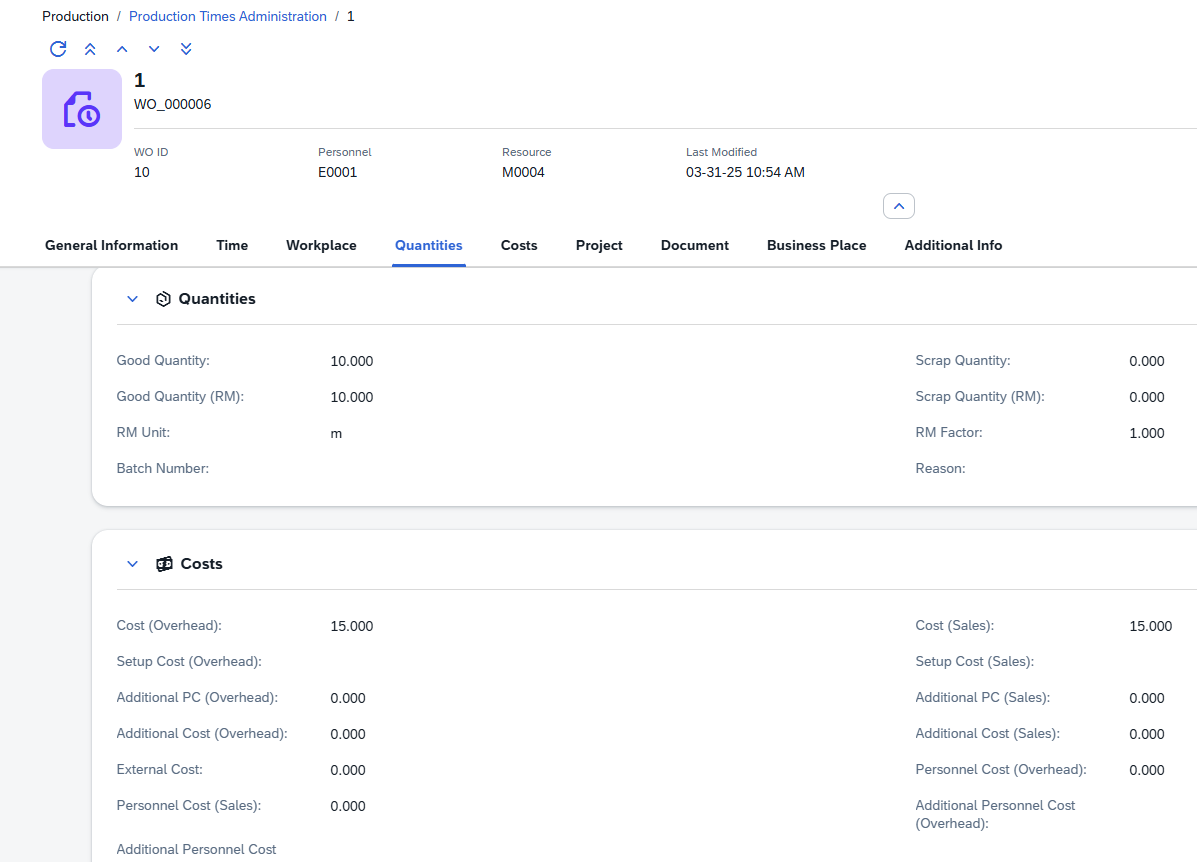
1.Direct URL: /views/production-times/{code}
Header
The page header identifies the booking at a glance.
Element |
Description |
|---|---|
Title |
The booking number (BuchNrId). |
Subtitle |
The order reference. |
WO ID |
The parent work order number. |
Personnel |
The operator ID. |
Resource |
The resource or workplace used. |
Last Modified |
Date and time of the last change. |
Use the navigation arrows in the header to step through bookings in the current filtered list without returning to the list view. You can also Duplicate the current booking to create a new entry pre-filled with the same values.
General Information
Identification and classification of the booking.
Field |
Description |
|---|---|
Booking No. |
The unique booking number. Assigned by the system. Read-only. |
WO ID |
The work order this booking is posted against. Use the lookup to link a work order; the Order field fills in automatically. |
Order |
The order reference from the linked work order. Filled automatically. |
WO Position |
The position line number within the work order. |
Operation |
The operation (routing step) code this booking is for. |
Type |
The booking type (e.g. regular, setup, rework). |
Personnel |
The operator performing the work. Pick from the personnel lookup. |
Document Date |
The posting date for accounting purposes. Defaults to today. |
Completion Flag |
Check this box if this booking represents the final completion of the operation. |
Time
The time interval covered by this booking.
Field |
Description |
|---|---|
Start Time |
The date and time when the work began. |
End Time |
The date and time when the work ended. |
Duration |
The calculated duration (End Time minus Start Time). Read-only. |
Time Factor |
A multiplier applied to the duration when calculating costs. |
Time Type |
The time type classification for this booking (e.g. regular, overtime). |
Personnel Time Type |
The time type applied to the personnel cost calculation. |
Workplace
The resource and location where the work was performed.
Field |
Description |
|---|---|
Resource |
The resource (machine or workplace) used. Pick from the resources lookup. |
Cost Center |
The cost center linked to the resource. Filled automatically when a resource is selected. |
Display Name |
The display name of the resource. Read-only. |
Station Name |
The station name within the resource. Read-only. |
Tool |
A tool ID associated with this booking, if applicable. |
Resource Position |
The resource routing position reference. |
Process |
The process code for this booking. |
Quantities
Output quantities recorded during this booking.
Field |
Description |
|---|---|
Good Quantity |
The quantity of acceptable output produced. |
Scrap Quantity |
The quantity of scrap produced. |
Good Qty (RM) |
The good quantity expressed in the raw material unit. |
Scrap Qty (RM) |
The scrap quantity expressed in the raw material unit. |
RM Unit |
The unit of measure for the raw material quantities. |
RM Factor |
The conversion factor between the production unit and the raw material unit. |
Batch Number |
The batch number to which the output is posted. |
Reason |
A reason code for scrap or rework quantities. |
Costs
Cost values calculated and posted with this booking. These fields are normally filled automatically based on the resource and personnel rates. They can be overridden manually when corrections are needed.
Field |
Description |
|---|---|
Overhead Cost (GK) |
Machine/resource overhead cost. |
Sales Cost (VK) |
Machine/resource sales cost. |
Setup Cost (GK) |
Setup overhead cost. |
Setup Cost (VK) |
Setup sales cost. |
Additional PC (GK) |
Additional piece cost (overhead). |
Additional PC (VK) |
Additional piece cost (sales). |
Additional Cost (GK) |
General additional overhead cost. |
Additional Cost (VK) |
General additional sales cost. |
External Cost |
Cost for outsourced or subcontracted work. |
Personnel Cost (GK) |
Personnel overhead cost. |
Personnel Cost (VK) |
Personnel sales cost. |
Additional Personnel Cost (GK) |
Additional personnel overhead cost. |
Additional Personnel Cost (VK) |
Additional personnel sales cost. |
Project
Project allocation fields for cost tracking purposes.
Field |
Description |
|---|---|
Project |
The project code this booking's costs are charged to. |
Project UID |
The unique identifier of the project record. |
Document
Document status and posting references for this booking.
Field |
Description |
|---|---|
External Processing |
Indicates whether this booking relates to a subcontract (external processing) operation. |
Canceled |
Whether this booking has been canceled. Read-only; set by the cancellation process. |
Cancellation Reference |
The booking number of the cancellation counter-entry. Read-only. |
Journal Entry |
The SAP Business One journal entry number linked to this booking's financial posting. Read-only. |
Goods Issue Doc |
The document entry of the linked goods issue posting. Read-only. |
Goods Receipt Doc |
The document entry of the linked goods receipt posting. Read-only. |
BOM Receipt Doc |
The document entry of the linked BOM goods receipt posting. Read-only. |
Slave from Master |
Indicates this record was generated as a slave booking from a master booking. Read-only. |
Business Place
The business place (branch or plant) this booking belongs to.
Field |
Description |
|---|---|
Business Place |
The business place ID. |
Business Place Name |
The business place name. Read-only. |
Additional Info
If your company has defined extra user fields for production times (UDF 1–15), they appear in a separate Custom Fields section. This section is shown only when such fields have been configured.
Tips
- To find all bookings for a specific work order quickly, use the WO ID filter and enter the work order number. You can also use the lookup button to search by order reference or item.
- Use Duplicate on the detail page to create a similar booking without re-entering all fields from scratch. The duplicate opens in create mode with all values pre-filled — just adjust the start/end times and quantities.
Note: Bookings that have been posted to SAP Business One (showing a value in Journal Entry or one of the document reference fields) should not normally be deleted or altered, as doing so may leave the financial ledger inconsistent. Contact your system administrator before editing posted bookings.
Note: To see operators currently clocked in (not yet clocked out), use the Active Work Order Times page instead.