Beas Manufacturing › Master Data › Production Times
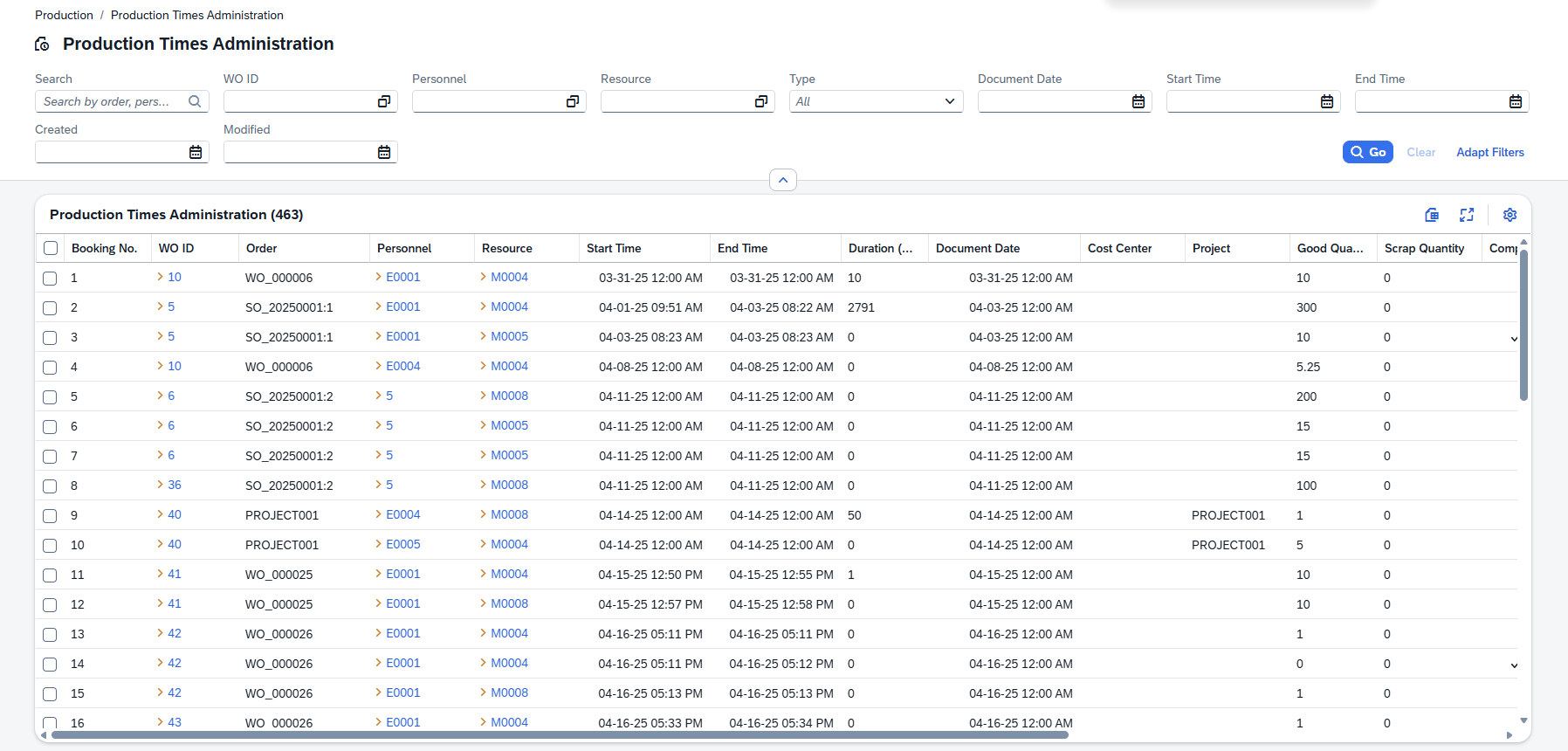
The Production Times page lists every completed time booking posted against a work order position. Each record captures the operator, resource, start and end time, duration, quantities produced and costs for one production interval. The page is used for reviewing posted times.
Note: This view is read-only.
Opening the view
1.In the main navigation, go to Master Data › Production Times.
2.The list shows all production time bookings. Use the filters to narrow the scope to a date range, work order or operator.
3.Click any row to open the time booking detail page.
4.Direct URL: /views/production-times
Filters and search
Type in the search box to search across Order, Personnel and Workplace/Resource at once. Use the individual filter fields for more targeted results.
Filter |
Description |
|---|---|
Booking No. |
Filter by the unique booking number (BuchNrId). Enter a number directly. |
WO ID |
Filter by one or more work order IDs. Use the selection dialog to select from the work orders list. |
Document Date |
Filter by document date. Enter a date range to see bookings within a specific period. |
Start Time |
Filter by the booking start time. |
End Time |
Filter by the booking end time. |
Created |
Filter by the record creation time stamp. |
Modified |
Filter by the last modification time stamp. |
Press Go to run the search with the current filter values. Press Clear to reset all filters .
Press Adapt filters to select any value(s) based on the columns in the list below.
List columns
The grid shows the most useful fields by default. Use the column settings button to show or hide additional columns.
Column |
Description |
|---|---|
Booking No. |
The unique system-assigned number for this time booking. |
WO ID |
The work order ID. Clicking the link navigates to the parent work order. |
Order |
The order reference or description associated with the booking. |
Personnel |
The personnel ID of the operator who performed the work. |
Resource |
The resource (machine or workplace) used. Clicking the link navigates to the resource detail page. |
Start Time |
The date and time when the work interval began. |
End Time |
The date and time when the work interval ended. |
Duration (Minutes) |
The total elapsed time of the booking (End Time minus Start Time) in minutes |
Type |
The booking type code (e.g. regular production, setup). |
The following columns are available but hidden by default:
Column |
Description |
|---|---|
Document Date |
The document date of the booking, which may differ from the actual start date. |
Cost Center |
The cost center the time was booked against. |
Project |
The project code linked to this booking. |
Good Quantity |
The quantity of good (acceptable) output recorded on this booking. |
Scrap Quantity |
The quantity of scrap output recorded on this booking. |
Completion Flag |
Whether this booking was marked as the final completion posting for the operation. |
Canceled |
Whether this booking has been canceled. |
Created |
The date and time the record was created. |
Created By |
The (SAP) user who created the record. |
Modified |
The date and time the record was last changed. |
Modified By |
The user who last changed the record. |
See further descriptions in Production Times - Detail description.