|
The Bill of Materials detail page is where you view, create and edit a single material line — one component consumed when the item is produced. Each line records which material is used, how much of it goes in, where it is taken from, the validity period and a range of production options. The page belongs to a manufactured item: you always open it from inside that item, never on its own.
Accessing the view:
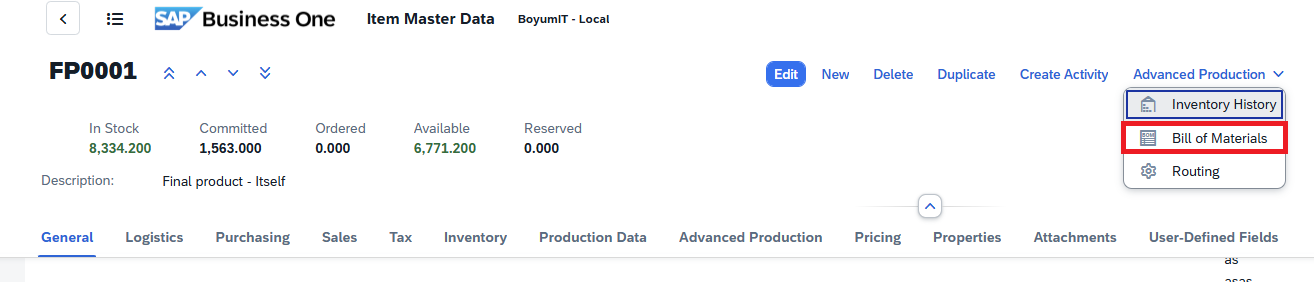
1. Open the Bill of Materials from SAP Web Client > Advanced Production > Bill of Materials > Open a BoM position
2. Click the "+" icon in the tool bar of the Bill of Materials screen to open the "Create Material" (BoM Detail) screen.
Direct URL: /views/items/{ID}/bill-of-materials/{positionID}
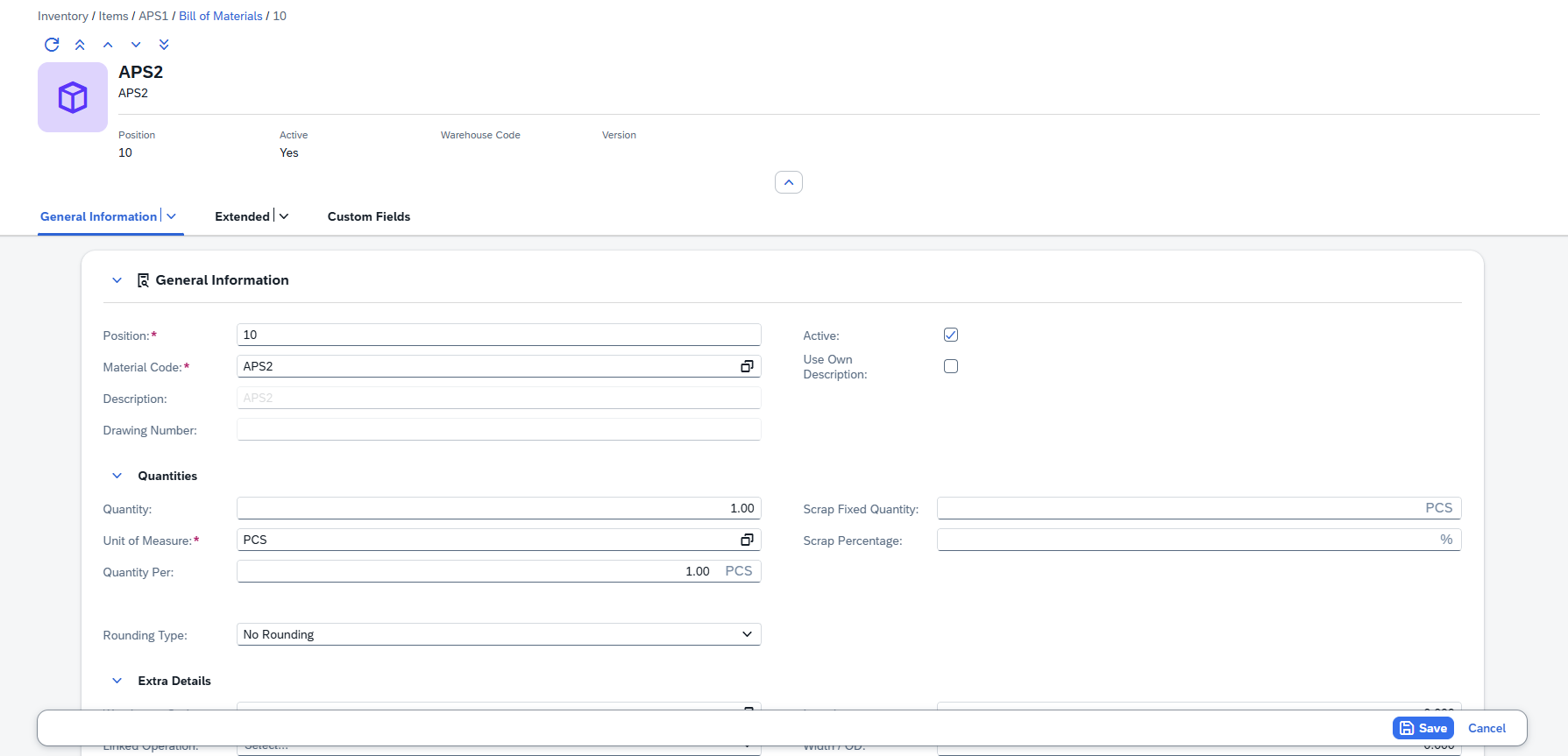
See General screen Controls
The Material Detail View is a read-only Object Page screen that displays all information about a single BoM position. It follows the SAP Fiori Object Page pattern: a header area with key facets at the top, followed by form sections organized into clearly labeled tabs.
The Material Detail View displays all information about a single material position within an item's Bill of Materials. It follows the SAP Fiori Object Page pattern with a header area and multiple form sections organized into clearly labeled groups.
Header
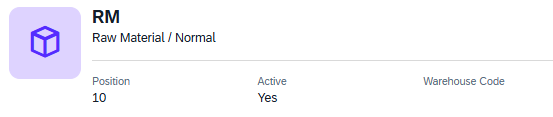
The header provides an at-a-glance summary of the material position:
•Avatar — Shows the assigned icon (SAP icon, Beas icon, or custom image). Falls back to a default inventory icon if none is assigned.
•Title — The Material Code (e.g., M0000001).
•Subtitle — The material description (e.g., "Material 1").
The header also displays key facets for quick reference:
Facet
|
Description
|
Position
|
The position number within the BoM (e.g., 20).
|
Active
|
Displays "Yes" or "No" to indicate whether the position is active.
|
Warehouse Code
|
The warehouse from which this material is issued (e.g., 02).
|
Version
|
The material version, if applicable.
|
|
The General Information tab is the default view when opening a material detail. It contains three groups of fields:
General fields
Field
|
Description
|
Position
|
Required. The line's position text within the Bill of materials. A value is proposed automatically for a new line.
|
Material Code
|
Required. The material consumed on this line. Use the Item selection to pick it from the item list.
|
Version
|
The version of the material reference. When applicable, select one from the lookup list.
|
Description
|
The material's description. It can only be typed in when Use Own Description is switched on; otherwise it follows the material's own description.
|
Drawing Number
|
An engineering drawing reference. Like the description, it can only be edited when the field "Use Own Description" is active.
|
Active
|
|
Use Own Description
|
When active, it lets you enter your own Description and Drawing Number instead of inheriting the material's description.
|
Quantities and Details
Quantity fields define how much of the material is required and how scrap is calculated:
Field
|
Description
|
Quantity
|
The input quantity required, displayed with its unit suffix (e.g., "12.345 dm").
|
Unit of Measure
|
Required. The unit for the input quantity (e.g., Pcs, kg, m). Select it from the Unit of Measure selection screen.
|
Quantity Per
|
The quantity per production unit, with the production UoM as suffix (e.g., "21.000 km").
|
Scrap Fixed Quantity
|
A fixed scrap amount added on top of the requirement to every production run, shown with its unit suffix (e.g., "25.000 m").
|
Scrap Percentage
|
A percentage-based scrap allowance (e.g., "5.00 %").
|
Rounding Type
|
The rounding method applied to quantity calculations: Default, At .5, Up, Down, Multiple of, or None.
|
Rounding Decimals
|
The number of decimal places used when rounding.
|
Extra Details
Field
|
Description
|
Warehouse Code
|
The warehouse from which this material is issued. Select one from the lookup.
|
Linked Operation
|
The operation position number to which this material is linked (i.e., the routing step where this material is consumed). Select one of the item's operations
|
Length
|
Material length, with the purchase length UoM as suffix (e.g., "100.000 dm").
|
Width
|
Material width, with the purchase width UoM suffix (e.g., "12.000 mm").
|
Height
|
Material height, with the purchase height UoM suffix (e.g., "12.000 cm").
|
Info
|
A free-text information field (full width).
|
Additional Text
|
An extended text area for detailed notes (full width).
|
|
The Extended tab contains validity settings and additional configuration options.
Area of Validity
Field
|
Description
|
Date From
|
The start date from which this material position is valid.
|
Date To
|
The end date after which this position is no longer valid.
|
I-Version From
|
The starting item version for which this position applies. Choose it from the selection screen.
|
I-Version To
|
The ending item version. Choose it from the selection screen.
|
I-Version Range
|
A version range expression. Pick versions from the selection screen.
|
Variants
Activate the Variants in the table by ticking the check boxes on the right for this BoM position.
Other
Field
|
Description
|
Breakdown
|
Whether and how a produced material is broken down further: No, Always or Only on shortage. Shown only for materials that can be broken down.
|
Variant Breakdown
|
The variant used when the material is always broken down. Shown only when Breakdown is set to Always.
|
Rest charge off
|
A remaining quantity to charge off. Shown only for materials that are batch managed.
|
Planning Method
|
How the material is planned: Automatically or No.
|
Synchronization
|
How the line is synchronized: Yes, No Delete or No.
|
Only Reservation Booking
|
When active, the material is only reserved, not issued.
|
Don't Post Scrap
|
When active, scrap is not posted for this line.
|
Image
|
An icon or image for the line, chosen from the selector.
|
Color
|
A color for the line, chosen from the color selector.
|
|
Custom Fields Tab
Displays up to 15 User-Defined Fields (UDF 1 through UDF 15). These are general-purpose text fields for storing additional business-specific information. Their labels and visibility are managed through the UDF Configuration screen.
Breadcrumb Trail
The breadcrumb trail at the top of the page shows your current location within the navigation hierarchy. It provides clickable links to navigate back to any parent level:
Items › {ItemCode} › Bill of Materials › {Position}
Example: Items › FP0001 › Bill of Materials › 20
Items › {ItemCode} › Operations › {Position}
Example: Items › FP0001 › Operations › 12
Clicking Items returns to the Items list. Clicking the item code returns to that item's detail view. Clicking Bill of Materials or Operations returns to the respective list/grid view. The last breadcrumb segment (the position number) represents the current page and is not clickable.
Help URL: https://help.beascloud.com/beas202606/index.html?bill-of-materials---detail.html
|
