The Bill of Materials list shows every material that makes up the manufactured item you currently have open — one row per position. From here you can review each material’s quantity, unit of measure, version and validity, and open any position to see or edit its full detail. The list always belongs to a single item: you reach it by opening that item first.
Accessing the view:
Open the Bill of Materials from SAP Web Client > Advanced Production > Bill of Materials
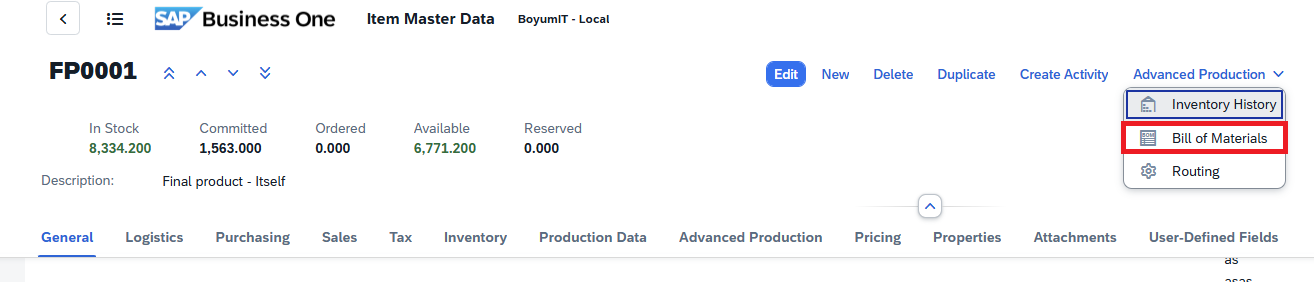
Direct URL: /views/items/[ID]/bill-of-materials.
Note: The Bill of Materials list is always tied to the item you opened. If that item cannot be found, the view shows a “not found” message with a button to return to the Items list instead.
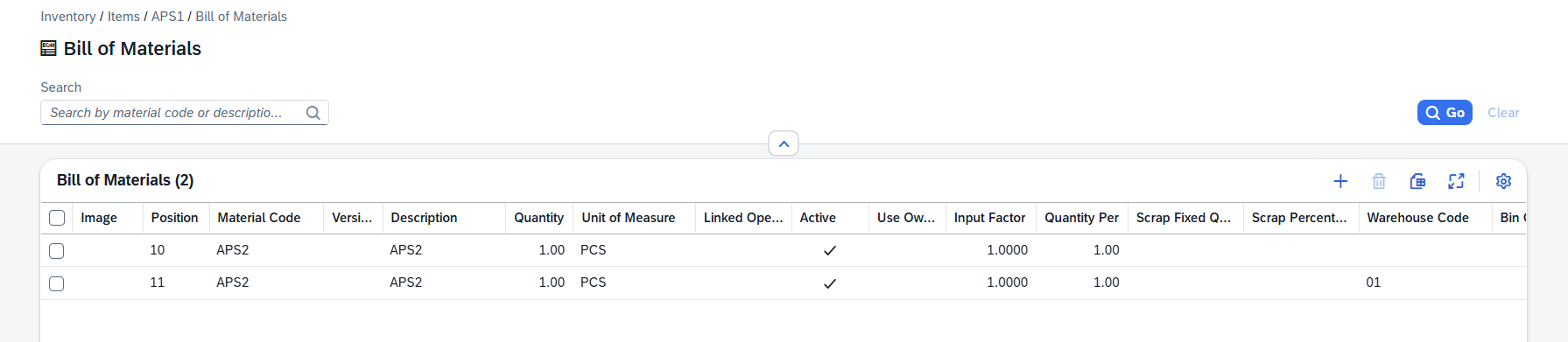
Header area
Search: Search for an operation by operation code or description.
Default Columns
Field |
Description |
|---|---|
Image |
Image saved for the operation |
Position |
Routing position |
Material Code |
Item number |
Version |
Item version |
Description |
Routing description. |
Quantity |
Quantity |
Unit of Measure |
Unit of Measure (Pcs, kg etc.) |
Linked Operation |
Linked routing identifier, when applicable. |
Active |
When check mark is enabled, the material is active |
Additional Columns
Column |
Description |
|---|---|
Color |
Color assigned to the position. |
Alternative Material |
An alternative material defined for this position. |
Use Own Description |
Marked when the position carries its own description instead of the material’s description. |
Drawing Number |
Engineering drawing reference of the material. |
Input Factor |
Factor applied to the input quantity. |
Quantity Per |
Quantity needed per unit of the parent item. |
Stock Quantity |
Quantity expressed in the stock unit of measure. |
Consumption Qty |
Quantity actually consumed. |
Scrap Fixed Quantity |
A fixed scrap amount added regardless of quantity. |
Scrap Percentage |
Scrap expressed as a percentage. |
Rounding Type |
How the quantity is rounded (No Rounding, Rounding at .5, Rounding Up, Rounding Down, Multiple of). |
Rounding Decimals |
Number of decimals used when rounding. |
Warehouse Code |
Warehouse the material is issued from. |
Bin Code |
Bin location within the warehouse. |
Length |
Length dimension of the material. |
Width / OD |
Width (or outer diameter) of the material. |
Height / ID |
Height (or inner diameter) of the material. |
Date From |
Start of the position’s validity period. |
Date To |
End of the position’s validity period. |
I-Version From |
First item version for which the position is valid. |
I-Version To |
Last item version for which the position is valid. |
I-Version Range |
The range of item versions the position covers. |
Planning Method |
How the position is planned (Automatically or No). |
Synchronization |
Synchronization behavior (Yes, No Delete, No). |
Breakdown |
How the position is broken down during planning. |
BBD Option |
Best-before-date handling option. |
Only Reservation Booking |
Marked when the position is only reserved, not posted. |
Don’t Post Scrap |
Marked when scrap should not be posted for this position. |
Variant Breakdown |
Variant-specific breakdown setting for the position. |
Info |
Extra status information about the position. |
Additional Text |
Free additional text on the position. |
Sort |
Sort order of the position within the list. |
Created |
Date and time the position was created. |
Created By |
User who created the position. |
Modified |
Date and time the position was last changed. |
Modified By |
User who last changed the position. |
Customer-defined fields (UDFs) configured for the Bill of Materials Header are appended automatically. Hidden columns are available in tool bar settings ( )
)
Row actions
Click any row's navigation arrow on the right to open the BoM. The list itself is the entry point; opening a row navigates you to the BoM detail.
Create Bill of Materials
Click the "+" icon in the tool bar to open the "Create Materias" (BoM Detail) screen.
Tips
Pre-filtered context: When launched from an item in the SAP Web Client, the list is automatically filtered to that item's BoMs. Clear the search to widen the view.
Pagination: The grid loads results in pages — use the toolbar pager controls to move through large result sets.
Export: Use the toolbar's export action to download the visible list as CSV or Excel.