Beas Manufacturing › Documents › Work Orders › (open a work order)
The Work Order detail page is where you view all the information for a single work order. It opens when you click a work order in the list. The page has a fixed header with the key facts and then a set of sections you can expand or collapse.
Opening the page
1.Go to Documents › Work Orders.
2.Click any row in the list to open that work order.
3.Direct URL: /views/work-orders/{code}
Note: This view is read-only.
Page header
The header is always visible and identifies the work order at a glance.
Work order detail page
The detail page shows all the information for a single work order. It is split into a header and several, collapsible sections described below.
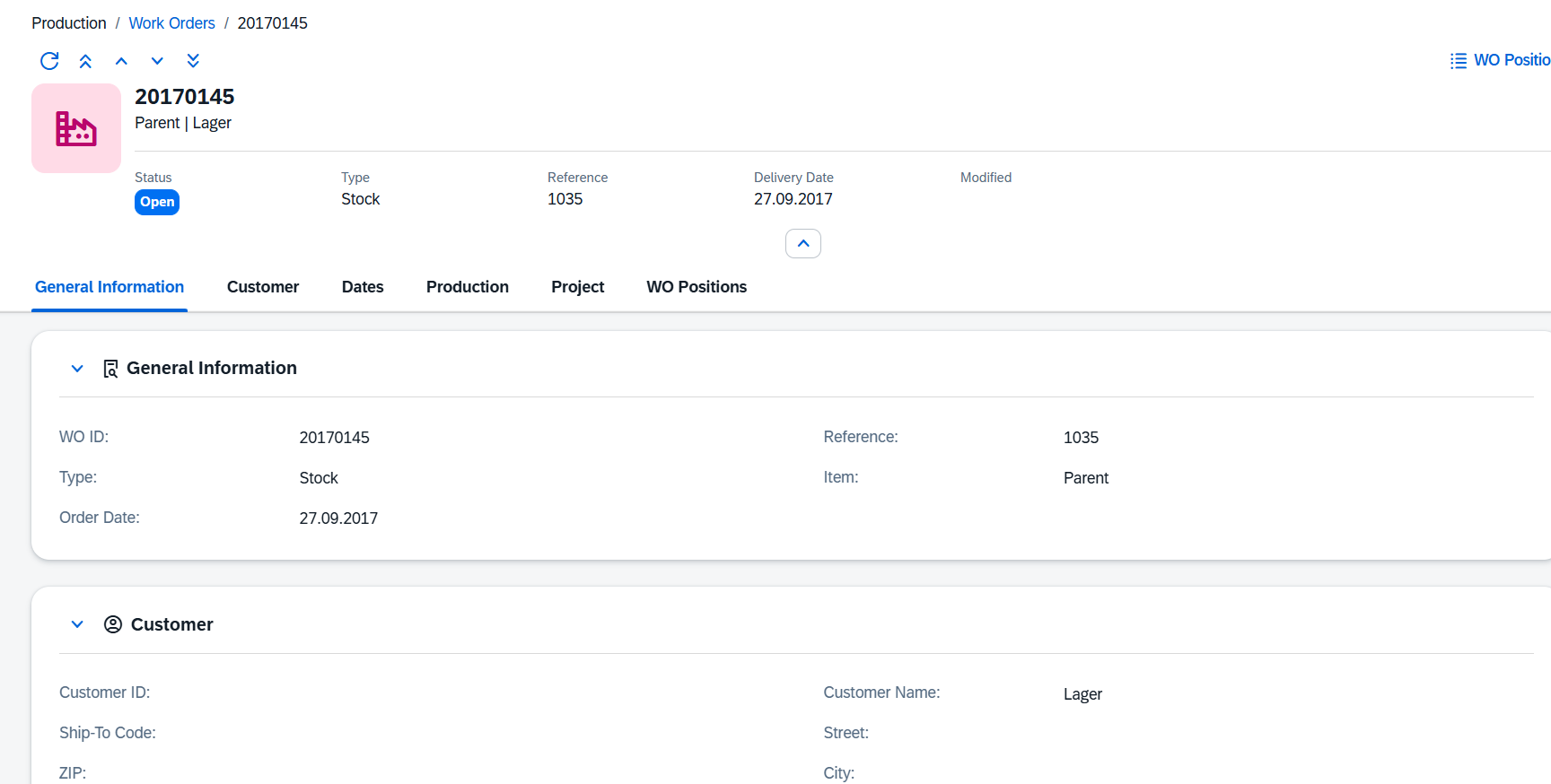
Header
The page header identifies the work order at a glance. It always shows:
Element |
Description |
|---|---|
Title |
The WO ID (DocEntry) of the work order. |
Subtitle |
The item code and customer name, shown as Item | Customer Name. |
Status badge |
The current status with its color: Open, In Work, Closed. |
Type |
The production type. |
Sales Order |
The linked sales order, if any. |
Delivery Date |
The due delivery date. |
Modified |
Date and time of the last change. |
WO Positions |
This direct link opens the WO Positions list search view. |
Use the navigation arrows in the header to move to the first, previous, next or last work order in the current list without returning to the list view.
General Information
The core identification of the work order.
Field |
Description |
|---|---|
WO ID |
The unique numeric identifier assigned by the system. |
Reference |
The order that this work order was created from. |
Type |
The production type (e.g. Standard, Rework, Repair). |
Item |
Required. The item (finished good) to be produced. |
Order Date |
The date the work order was entered. |
Customer
Customer details for the work order. All fields are optional; fill them in when the order is linked to a customer delivery.
Field |
Description |
|---|---|
Customer |
The customer code. |
Customer Name |
The customer's name. |
Ship-To Code |
The customer's ship-to address code. |
Street |
The delivery street address. |
Zip |
The delivery postal code. |
City |
The delivery city. |
Country |
The delivery country. |
Phone |
A contact phone number. |
Priority |
The production priority for this order. |
Project |
A project code to link the order to for cost tracking. |
Branch |
The business place (branch) the order belongs to. |
Dates & Status
Production schedule, current status and free-text notes.
Field |
Description |
|---|---|
Status |
The current status text (e.g. Open, In Work, Closed) driven by the Status ID. |
Status Description |
The status code. |
Delivery Date |
The date the finished goods must be delivered to the customer. |
Start Date |
The planned date and time when production is to begin. |
End Date |
The planned date and time when production is to finish. |
Additional Text |
A free-text field for longer notes or instructions relating to the order. |
Production
Quantities and flags that reflect the progress and nature of the production run. All fields in this section are read-only and are updated by postings.
Field |
Description |
|---|---|
Work Time |
The total work time already posted against this order. |
Planned Time |
The planned (target) work time for the entire order. |
Receipt Count |
The number of goods receipts that have been posted for this order. |
Overhead |
The overhead costs posted to the order. |
Closed |
Indicates whether the order has been closed. |
Locked |
Indicates whether the order is locked against further changes. |
Planning Order |
When checked, this is a planning order only and has not yet been confirmed for production. |
Project
Additional project-tracking fields. These are optional and used when the work order is linked to a larger project.
Field |
Description |
|---|---|
Status Description |
A free-text description of the current status; set by the posting process. |
Status % |
The completion percentage of the order. |
Project User 1 |
A free-text field for a project-related user reference. |
Project User 2 |
A second free-text field for a project-related user reference. |
Project State |
A free-text description of the project state. |
Project Info 1 |
A free-text field for additional project information. |
Project Info 2 |
A second free-text field for additional project information. |
Project UDF 1–4 |
Four user-definable fields for project-specific data. Labels and usage are defined per installation. |
WO Positions
The Positions section shows the lines that make up the work order — the bill of materials components and routing operations that are consumed or performed during production. The grid displays the following columns:
Column |
Description |
|---|---|
Line |
The sequential line number within the work order. |
Item Code |
The component item or operation code on this line. |
Item Name |
The description of the component or operation. |
Status |
The status of this individual position line. |
Qty Planned |
The quantity planned for this line. |
Qty Made |
The quantity already produced or consumed. |
UOM |
The unit of measure for the quantities. |
Warehouse |
The warehouse the component is issued from. |
Delivery Date |
The required delivery date for this line. |
Custom Fields
If your company has defined extra user fields for work orders (UDF 1–15), they appear in a separate Custom Fields section. This section is shown only when such fields have been configured.