PATH: Inventory > Item Master Data > right-click menu > Advanced duplicate / item creation
In this window you can create or copy new items.
When creating an item, Beas always makes a copy of the item and copy all item information linked to it e.g. Bill of materials, routing, quality control information, warehouse information, but no stock.
The base item is defined in Configuration wizard > Master data > Item > Default item
In this way it is possible to work with templates.
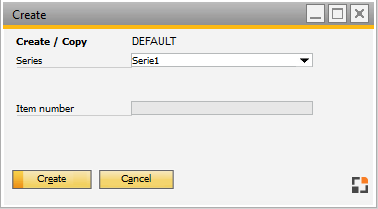
Window artikel_new
Field |
Meaning |
|
Series |
|
|
Item number |
|

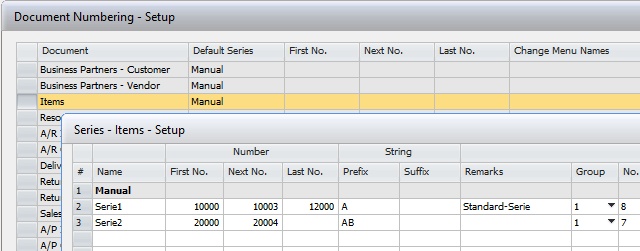
Working with Item Generation
With the item generation function it is possible to define templates or item number / description generator.
See Generate Item
With this item generation the creation of items can be more automated.
Example: Generate item numbers and description related to a 2-Level item number generation.
Additionally, it is possible to use another template item related to the chosen Group/Selection.
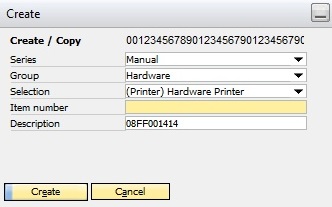
Window artikel_new
Additional fields related to Item generation settings:
Field |
Meaning |
Group |
The Item Generation Group |
Selection |
The Second Level for Item Group |
Description |
The new description |
Beas uses the DI-API. The copy function does not exist. Beas exports the source item to XML and imports this XML via DI-API.
It is not compatible with Item Version Control. It makes only a copy of the Bill of materials and Routing which have the same number as the item number.
Beas copies the following tables: OITM, BEAS_STL, BEAS_APL, BEAS_APL_WKZ, BEAS_STL_HEADER, ABEAS_APL_HEADER, BEAS_ITEM_VERSION, BEAS_OITM_PARAMETER, BEAS_OITM_PRODUKTKONFIGURATOR, BEAS_QSVERWEIS |
See Item generation
Limitation: SAP Item master attachments are not copied together with the Item Duplication functionality in Beas.