Apart from the order information, additional fields are shown – depending on the item type.
Window settings are available
Note: Localization in this window is not supported.
Field |
Meaning |
|||||||||||||||||
|---|---|---|---|---|---|---|---|---|---|---|---|---|---|---|---|---|---|---|
Purchase order number |
Select from open purchase orders or purchase requests (switch on the right to open the window open purchases)
You can insert the number manually or you can choose this from a list. If you insert the number manually, you can insert only a Purchase order, not Pre-Invoice or Quotation number.
If a Document number exists more than once, Beas uses the last document. |
|||||||||||||||||
Supplier number |
Supplier number |
|||||||||||||||||
Supplier reference number (only for GO type multiple) |
Free text |
|||||||||||||||||
Name |
Supplier name |
|||||||||||||||||
Item |
Item |
|||||||||||||||||
Item description |
Item description |
|||||||||||||||||
Pur. order quantity |
Purchases quantity |
|||||||||||||||||
Remaining quantity |
Remaining quantity |
|||||||||||||||||
Quantity to post in |
|
|||||||||||||||||
Date of entry (Only type "single") |
The date for the entry. It is normally the current day. Depending on the settings (goods receipt type simple or multiple) this field is to be found under logistics tab. |
|||||||||||||||||
Reference date |
Corresponds to Tax date in SAP document. |
|||||||||||||||||
Warehouse |
|
|||||||||||||||||
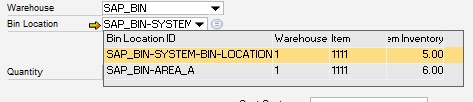
Bin location |
LIMITATION: The receipt process linked with a purchase order is not able to create receipt for the same line into 2 different bin locations at the same time. As a workaround for this, the user can generate the receipt document in 2 steps or receipt full quantity in one bin location and move the required quantity to a different location after the receipt is created. |
|||||||||||||||||
Expiry date |
Only possible for batch or serial number items. Determines the expiration or end of warranty date. This date is calculated automatically. Setup in Item master > batch tab or Serial number tab |
|||||||||||||||||
Supplier Batch No |
Only possible for batch or serial number items. A supplier batch number can be specified here. At batch: Entered in the field Supplier batch of the batch. If the field "No new batch" is active, the batch entered here is also used as internal batch number. For serial number: Next to the serial number, the batch is entered in the field "Batch". |
|||||||||||||||||
Serial number |
Different depending on selected "Type "in Configuration wizard.
|
|||||||||||||||||
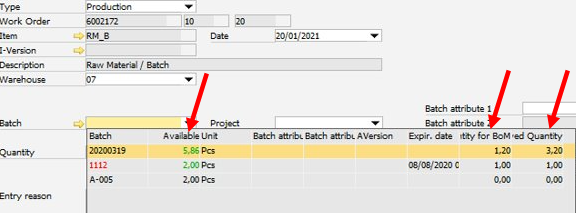
Batch |
|
|||||||||||||||||
No new batch (Only type "single") |
Only for batch items. No automatic generation of the batch number takes place if this is activated. Instead, the batch number entered in delivery batch No. is used. Otherwise the next number is automatically generated. For more on the batch number see Batch Management. |
|||||||||||||||||
CFOP |
|
|||||||||||||||||
Remarks |
Input field for remarks. |
|||||||||||||||||
Last entry |
Last posting entry. |
|||||||||||||||||
UDF 1–15 |
User-defined fields Note: The information entered in these fields is saved in the table "BEAS_PLANDOCUMENT_LINE", but not in any other UDFs in Beas. |




Only displayed for Goods receipt type "multiple"
Lower tabs
Content: Previously entered items which are to be posted in with the same document.
Archive: Previous goods receipts created on this work station.
Logistics:
Field |
Meaning |
|---|---|
Posting date |
The date for the entry. It is normally the current day. |
Document date |
Creation date of the selected document. |
Remark |
Free text. |
Label |
Only for compatibility reasons. Can be used for own Macros. |
In the lower list items selected for posting are displayed. With a click on the deletion icon they can be removed. Click the goods receipt button to perform the posting.
Functions
Function |
Meaning |
|---|---|
Line Add |
To post in a second item. Previously entered values are displayed below, the upper fields are emptied for new entries. If for a document row more than one inflow was added (e.g. a second batch) the second entry is locked and the selected stock of the first row is used, because for a goods receipt only one warehouse may be selected per document line. |
Goods receipt PO |
Execute the posting. |
Cancel |
Close window without saving changes. |
Post and new batch |
Only for Goods receipt Type "single" and batch-managed items. If an item was entered after posting, the screen not reset. You can easily record the next batch for the same order. |