Beas Manufacturing › Documents › Work Orders › (open a work order) › View Positions › (open a position)
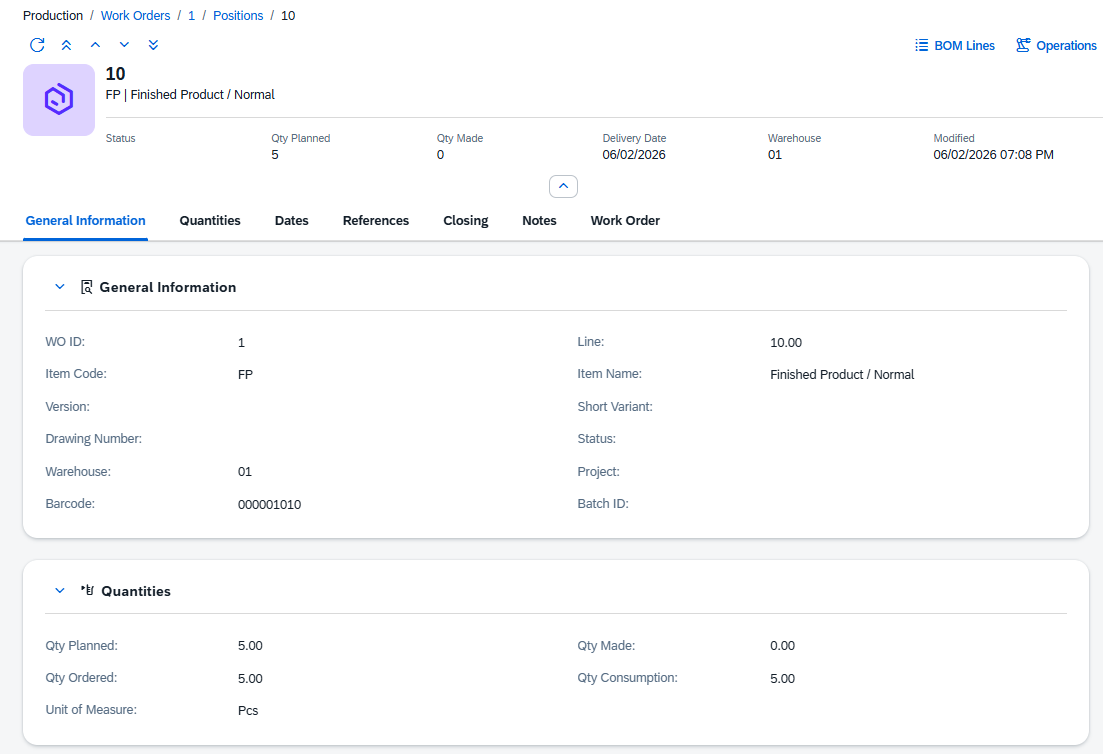
The Work Order Position detail page is where you view a single production line. It shows what item is being produced, how many have been planned and made, the schedule dates and any references to the originating document. From the page header you can also navigate to the position’s BOM Lines, Operations and Cost Calculation sub-views.
Opening the view
1.Open a work order and press View Positions, then click a position row.
2.Alternatively, go to Documents › Work Order Positions and click any row.
3.Direct Link: /views/work-orders/{docEntry}/positions/{Position ID}
Note: This view is read-only.
The header identifies the position and shows its most important figures.
Element |
Description |
|---|---|
Title |
The line number of the position within its work order. |
Subtitle |
The item code and item name, shown as Item Code | Item Name. |
Status |
The current status code of the position. |
Qty Planned |
The planned production quantity. |
Qty Made |
The quantity already produced and goods-receipted. |
Delivery Date |
The date the output is due. |
Warehouse |
The warehouse the output is posted to. |
Modified |
Date and time of the most recent save. |
Navigation buttons |
|
Edit |
Click this button to make the position editable. Enter your changes and click Save in the right bottom corner. |
BOM Lines |
Opens the BOM Lines view (read-only) to view Bill of Materials details for this position. |
Operations |
Opens the Operations Lines view (read-only) to view Bill of Materials details for this position. |
General Information
Identifies the position and the item being produced. Most fields in this section are set when the work order is created and are read-only.
Field |
Description |
|---|---|
WO ID |
The ID of the parent work order (DocEntry). |
Position ID |
The sequential line number of this position within the work order. |
Item Code |
The item (finished good) to be produced. Set when the position is created from the work order. |
Item Name |
The description of the item. |
Version |
The version of the item being produced, when version control is active. |
Short Variant |
The short variant code of the item, if applicable. |
Drawing Number |
The engineering drawing reference for the item. |
Status |
The current status code of the position. |
Warehouse |
The warehouse the finished output is to be posted to. |
Project |
A project code for cost tracking. Links this position’s costs to the project. |
Barcode |
A barcode identifier for this position line. |
Batch ID |
The batch ID that will be assigned to the output when it is goods-receipted. |
Quantities
The planned, made, ordered and consumed quantities for this position. Qty Planned and Qty Made are read-only and updated by postings. Qty Ordered and Qty Consumption can be edited directly.
Field |
Description |
|---|---|
Qty Planned |
The quantity planned to be produced. Set when the position is created. |
Qty Made |
The quantity already produced and confirmed by a goods receipt posting. |
Qty Ordered |
The quantity ordered or otherwise committed for this position. |
Qty Consumption |
The quantity of components consumed against this position so far. |
Unit of Measure |
The unit of measure for all quantities on this position. |
Dates
The planned schedule for this position. All date fields are read-only here; they are set from the parent work order when the position is created.
Field |
Description |
|---|---|
Start Date |
The planned date and time when production of this position is to begin. |
End Date |
The planned date and time when production of this position is to finish. |
Delivery Date |
The date the finished output of this position is due. |
References
Traceability links back to the originating document that generated this position, plus a sort order field.
Field |
Description |
|---|---|
Base Entry |
The internal key (DocEntry) of the source document this position was created from. |
Base Doc Num |
The document number of the source document. |
Base Line |
The line number within the source document. |
Base Type |
The type of the source document (e.g. Sales Order, Production Order). |
Sort Order |
A numeric value that controls the sequence in which this position is displayed in lists and reports. |
Closing
Fields that record the closing state of the position. All are read-only and updated by the system when the position is closed.
Field |
Description |
|---|---|
Closed |
Checked when the position has been formally closed. A closed position cannot receive further postings. |
Closed Date |
The date and time the position was closed. |
Closed By |
The user who closed the position. |
Print Flag |
Checked when the position has been printed (e.g. a picking list or production label). |
Print Date |
The date the position was last printed. |
Notes
A free-text area for any additional instructions or comments that apply to this position.
Field |
Description |
|---|---|
Additional Text |
A free-text field spanning the full section width. Use it for special handling notes, quality requirements or any other information relevant to this production line. |
Work Order
A read-only summary of the parent work order’s key fields, shown here for reference without having to navigate back to the work order. All fields in this section are read-only.
Field |
Description |
|---|---|
WO Customer |
The customer code of the parent work order. |
WO Customer Name |
The customer name of the parent work order. |
WO Type |
The production type of the parent work order. |
WO Sales Order |
The sales order linked to the parent work order. |
WO Status |
The current status of the parent work order. |
WO Project |
The project code of the parent work order. |
WO Order Date |
The order date of the parent work order. |
WO Start Date |
The planned start date and time of the parent work order. |
WO End Date |
The planned end date and time of the parent work order. |
WO Delivery Date |
The delivery date of the parent work order. |
WO Closed |
Checked when the parent work order is closed. |
WO Locked |
Checked when the parent work order is locked. |
WO Print Flag |
Checked when the parent work order has been printed. |
WO Notes |
The additional text from the parent work order. |
UDF
If your company has defined extra user fields for work order positions, they appear here as UDF 1 through UDF 15. Labels and data types are configured per installation. This section is only shown when at least one custom field has been set up.